
- Download and install PlistEdit Pro.
- This is the tool to edit the "carrier.plist" file.
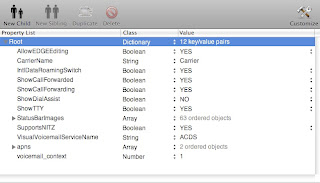

The “call forwarding” popups in the iPhone 3G can be disabled by editing thecarrier.plist file. This file can be find in this forlder:/System/Library/Carrier Bundles/Unknown.bundle/
Search for :
[key]ShowCallForwarded[/key]
[YES/]
[key]ShowCallForwarding[/key]
[YES/]
Now change the “YES” values into “NO”
[key]ShowCallForwarded[/key]
[NO/]
[key]ShowCallForwarding[/key]
[NO/]
Reboot your iPhone and the popup’s are gone!
UPDATES - REVIEWS
- Review: 13 Reasons iLike iPad - How About You?
- Review: I Am A Student - Is It Worth To Buy an iPad?
- Review: After 1 month using iPad
- Review: What is it like after 2 months owning an iPad?
- Review: iPad - After More than 100 Days
- Review: After 4 months - List of my 11 Pages of iPad Apps
- Review: STM Scout XS
- Review: Screen Privacy Filter
- Review: Yoobao iPad Case
- Review: Apple Wireless Keyboard


