
Showing posts with label Tiny Umbrella. Show all posts
Showing posts with label Tiny Umbrella. Show all posts
Tuesday, December 25, 2012

Friday, March 11, 2011
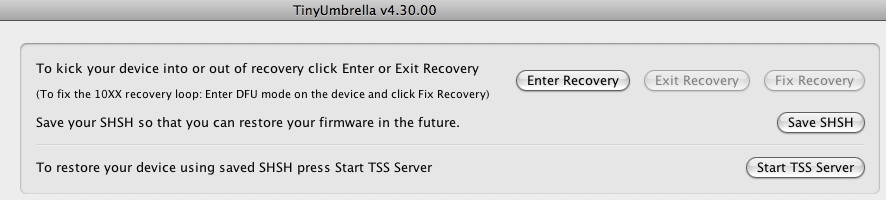
[HOW-TO] - Fix the 10XXX Recovery Loop
- Download the latest TinyUmbrella 4.300.00
- Connect your device
- Enter DFU Mode on the device and click Fix Recovery

Monday, October 11, 2010
[HOW-TO]: Save SHSH Blobs of iOS 4.1 on iPhone, iPod touch and iPad
So, to be able to jailbreak in the future using the same tools (i.e. on iOS 4.2 and newer), you have to save your SHSH blobs. You can follow those 3 steps to save your SHSH blobs of any iOS device.


[Source: Save SHSH Blobs of iOS 4.1 on iPhone, iPod touch and iPad]
NOTE: If you have problem in getting out from your "Recovery Mode", you can use Tiny Umbrella and select the "Kick Device Out of Recovery"
Subscribe to:
Posts (Atom)
LinkWithin
