Konova

Showing posts with label Unlock. Show all posts

Tuesday, September 24, 2013

[HOW-TO] - Nexus 7 (2013) One Click Toolkit for Mac OS X (Lock, Unlock, Root, Unroot)


Toolkits for Mac OS are not easy to find. Most root/unroot/lock/unlock utilities are meant for PC users. I found this utility here to assist me in rooting my Nexus 7 (2013) LTE Model which I recently purchased.

These toolkits will allow you to root, install TeamWin Recovery, unlock bootloader, and lock bootloader. All with a simple click of a button for your Nexus 7 2013 model!

 How Do I Use These Toolkit?

1. Download the toolkit of your choice using the links below.
2. Unzip the file and click on click on the green Android icon.
3. Enter your phone into bootloader mode: First power off your tablet and make sure it's unplugged then,press the volume up, volume down, and power button all at the same time. When your phone vibrates let go of the power button, but keep holding onto the volume up and down button. You will now see a green start screen.

 4. Follow directions on the screen.

One-Click Root Toolkit
One-Click TeamWin Recovery Toolkit
One-Click Unroot/Stock Toolkit
One-Click Unlock Bootloader Toolkit
One-Click Lock Bootloader Toolkit

Saturday, July 21, 2012

[LIST] - Unlockable iPhone Basebands Supported by Ultrasn0w

You can check some of the supported and unsupported iPhone basebands below:

Supported iPhone 4 / 3GS / 3G Basebands:

  • 04.26.08
  • 05.11.07
  • 05.12.01
  • 05.13.04
  • 01.59.00
  • 06.15.00
  • 05.14.02 via 06.15.00 » [How-To]
  • 05.15.04 via 06.15.00 » [How-To]
  • 05.16.01 via 06.15.00 » [How-To]
  • 05.16.02 via 06.15.00 » [How-To]

Unsupported Basebands:

  • 05.14.02
  • 05.15.04
  • 05.16.01
  • 05.16.02
  • 02.10.04
  • 03.10.01
  • 04.10.01
Alternatively, these Ultrasn0w unsupported basebands can be unlock using the SIM unlocking tool like Gevey SIM and Rebel SIM – a hardware unlock that works on all iPhone Firmware and basebands.
On the other hand, iPhone 3G/3GS users with baseband 05.14.02 / 05.15.04 / 05.16.01 / 05.16.02 will be able to unlock their iPhone by updating its baseband to iPad’s 6.15.00 baseband.iPhone 4 Unlockable Baseband


Source: List of Unlockable iPhone Basebands Supported by Ultrasn0w | iPhone Wiki

Thursday, December 22, 2011

[HOW-TO] - Unlock iPhone 4, iPhone 3GS On iOS 5.0.1 With Ultrasn0w 1.2.5

  • Ultrasn0w 1.2.5 to unlock iPhone 4 and iPhone 3GS running iOS 5.0.1 has recently been released. Ultrasn0w 1.2.5 does NOT unlock high basebands. 
  • Only basebands mentioned below can be unlocked. Ultrasn0w 1.2.5 mainly brings support to iOS 5.0.1.


Ultrasn0w 1.2.5 Unlocks:

  • 01.59.00
  • 04.26.08
  • 05.11.07
  • 05.12.01
  • 05.13.04
  • 06.15.00


How To Unlock iPhone 4 / 3GS On iOS 5.0.1 With Ultrasn0w 1.2.5

STEP 1: You’ll need to jailbreak your iPhone 4 or iPhone 3GS running iOS 5.0.1 using Redns0w with our guide posted here.

STEP 2: Once jailbroken, head to Cydia -> Manage -> Sources.

STEP 3: Now tap on Edit -> Add then write down the following repo: http://repo666.ultrasn0w.com.

STEP 4: After adding the repo, search in Cydia for Ultrans0w and you’ll tap on it then hit install on the top right of screen.


  • Respring and tethered boot
  • Your iPhone 4 and iPhone 3GS unlocked.

Friday, March 18, 2011

[HOW-TO] - Unlock iPhone 4 Basebands 2.10.04 / 3.10.01 with Gevey SIM


  • Are you ready to unlock your iPhone 4 basebands?
  • A new group of hacker called "Gevey Team" managed to unlock iPhone 4 running on iOS 4.1 and 4.2.1 basebands 2.10.04 and 3.10.01 using hardware tool.
  • Initially when the 1st hardware tool unlock was released back during the iPhone 3G days, I used to try it but it gave me a BAD experience!
  • The simcard always seems to be stuck in the simcard slot! I have to send for service centre to get it out. The additional thickness that caused it to get stucked.
  • Thus - if you dare to try it, please beware...! You have been warned!

Saturday, March 12, 2011

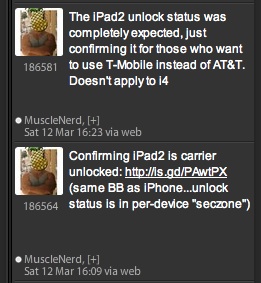
iPad 2 - Sold Officially Unlock in USA

Here’s you chance to buy the iPad 2 from USA (or probably anywhere in the 26 countries as indicated by Apple on March 25, 2011) since its officially unlock. The ones being sold to AT&T are cheaper in the sense its package with their Data Plan.

screenshot_01-2011-03-12-18-00.jpg

Thursday, March 10, 2011

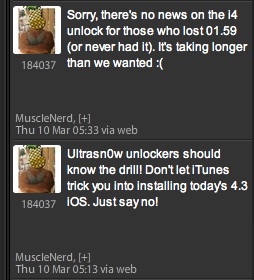
Unlockers - Stay Away from iOS 4.3!

Musclenerd and Veeence warned for the eagerly waiting iPhone 4, please stay away from iOS 4.3 upgrade!
There are too many users “accidentally” (that’s what they claimed) upgrade to iOS 4.3.. *sigh*... Just to tell you that we have warned you guys!!

screenshot_01-2011-03-10-07-38.jpg

screenshot_03-2011-03-10-07-38.jpg

Friday, February 25, 2011

iOS 4.3 GM will also be launch together with iPad 2 on March 2, 2011

(Source: Photo)
  • What's excite most Apple fans are not only because Apple will be releasing iPad 2, but they are anxiously waiting for iOS 4.3 to be release too.
  • When iOS 4.3 is release, the  unlock for 2.10.04/3.10.01 will also be release by the Dev Team as promised.

Saturday, February 19, 2011

Unlock iPhone 4 - Ultrasn0w to release in Feb. 28

  • As iPhone unlockers who are in touch with the latest news from the unlock world may be already aware, the iPhone Dev Team have announced that they will release the unlock for 2.10.04/3.10.01 only after iOS 4.3 is out.

Thursday, February 10, 2011

Unlock iPhone baseband 02.10.04, 03.10.01 & 04.10.0

Vincent, who happens to be the admin of TheiPhoneWiki, just confirmed that the unlock for all iPhone 4 basebands equal and above 02.10.04 is almost complete. It means that the upcoming version of Ultrasn0w will be able to unlock iPhone 4 baseband 02.10.04, 03.10.01 & 04.10.01.

screenshot_01-2011-02-10-20-48.jpg

UPDATE (FEB. 16, 2011) --> HOW TO PRESERVE YOUR BASEBAND.

Using Sn0wbreeze 2.2
Using PwnageTool 4.2

Monday, November 29, 2010

[How-To]: Update iPhone 3GS / 3G Baseband to 06.15.00 with PwnageTool 4.1.3 for iOS 4.2.1 Unlock

  • I owned a locked iPhone 3G and was stucked on 05.14.02 for quite sometime.
  • Today, Dev Team released the new Pwnage Tool and Ultrasn0w to Jailbreak and Unlock the 3G.
  • The instructions was quite easy and I managed to get it unlock within 40 minutes.
Source: Redmond Pie

A special edition of PwnageTool (version 4.1.3) has been released which can update the baseband of iPhone 3GS & 3G to 06.15.00 so that they can be unlocked using Ultrasn0w 1.2 on the latest iOS 4.2.1 or iOS 4.1 firmware. This is important because basebands 05.14.xx and 05.15.xx are currently not unlockable using Ultrasn0w.

Follow the instructions posted below to update your iPhone 3GS or 3G to 06.15.00 baseband and jailbreak it on iOS 4.1 /4.2.1.
Step 1: Download iPad 3.2.2 firmware file from here (Required for 06.15.00 baseband).
Step 2: Download the required iOS 4.2.1 or iOS 4.1 firmware file.
Step 3: Download PwnageTool 4.1.3 from here.
Step 4: Start PwnageTool 4.1.3 and point it to iOS 4.2.1 / 4.1 firmware file.

Step 5: You will now be prompted to update your baseband to 06.15.00 so that it can be unlocked using Ultrasn0w 1.2.

Step 6: Now point PwnageTool 4.1.3 to iOS 3.2.2 for iPad. PwnageTool will now fetch the exploitable 06.15.00 baseband from 3.2.2 firmware and will replace it the baseband in iOS 4.2.1 / 4.1.

Step 7: Click the next arrow now to allow PwnageTool to create this custom ipsw file for you.


Step 8: Now follow the following steps to enter DFU mode:
  • Hold Power and Home buttons for 10 seconds
  • Now release the Power button but continue holding the Home button for 10 more seconds
  • You device should now be in DFU mode

Step 9: You will now have to restore your iPhone to this custom firmware 4.2.1 / 4.1 file. Start iTunes, click on your device icon from the sidebar in iTunes. Now press and hold left “alt” button (“Shift” button on Windows) on the keyboard and then click on “Restore” (Not “Update” or “Check for Update”) button in the iTunes and then release the “Shift” button.

This will make iTunes prompt you to select the location for your custom firmware 4.2.1 / 4.1 file. Select the required custom .ipsw file and click on “Open”.
Step 10: Now sit back and enjoy as iTunes does the rest for you. This will involve a series of automated steps. Be patient at this stage and don’t do anything silly. Just wait while iTunes installs the new firmware 4.2.1 / 4.1 on your iPhone 3GS or 3G. Your iOS device screen at this point will be showing a progress bar indicating installation progress. After the installation is done, your iPhone will restart automatically and you should now have a fully jailbroken iPhone 3GS or 3G with 06.15.00 baseband.
UPDATE 1: A new fixed version of PwnageTool bundle (download here) for iPhone 3GS on iOS 4.1 has been released. Here’s how to use it:
a. Copy PwnageTool that you downloaded in Step 3 to a folder on your desktop. Right click, and then click on “Show Package Contents” as shown in the screenshot below.

b. Navigate to Contents/Resources/FirmwareBundles/ and copy-paste thisiPhone2,1_4.1_8B117.bundle file in this location and then simply close this folder. Now follow Step 4 and onwards as posted in the guide above.

How to Unlock iPhone 3GS & 3G on iOS 4.2.1 / 4.1 Follow the complete step by step guide posted here to unlock your iPhone 3GS and 3G on 06.15.00 baseband, running iOS 4.2.1 or 4.1 with Ultrasn0w 1.2.

[How-To]: Unlock your iPhone 3G/3GS on 4.2.1/ 4.1

Source: How to Unlock iOS 4.2.1 with Ultrasn0w 1.2 [Video Guide]


Saturday, October 16, 2010

Ultimate Jailbreak and Unlock Wizard

  • With so many iPhone Models around - 2G, 3G, 3GS and 4,
  • and so many iOS versions - 2.0 to 4.1 (latest 4.2 beta)
  • and so many Modem Firmwares (Baseband)
  • All of us are getting confused whether our iPhone is Jailbreakable or Unlockable.
  • Here's a website that will be able to help you:
  • In the above screen, if my iPhone 3G iOS 3.1.2 with baseband 05.13.04, I am safe!

Jailbreak and Unlock iPhone 3G iOS 3.1.2 with Baseband 05.12.02

  • We can Jailbreak iPhone 3G with 3.1.2
  • Unfortunately, current Ultrasn0w is unable to Unlock the Baseband 05.12.02
  • My old (USA-version) iPhone 3G has become an iPod Touch only (for the time being).
  • The good news is that Sherif Hashim tweeted that the Unlock solution for 05.12.02 and 02.10.04 will only be release after iOS 4.2 is out. Most probably to avoid Apple closing the hole.
UPDATE:

Wednesday, August 4, 2010

How To: Unlock iPhone 4

Finally! Dev Team released the Unlock Solution!


Dev Team is happy to tell you that their ultrasn0w carrier unlock now supports the iPhone4!
Version 1.0-1 of ultrasn0w works for:
  • iPhone4 baseband 01.59
  • 3G/3GS basebands 04.26.08, 05.11.07, 05.12.01 and 05.13.04
Step 1 - Jailbreak your iPhone 4 using JailbreakMe 2.0 star. (You can refer our guide on How to Jailbreak iPhone 4, 3GS, 3G iOS 4 / 4.0.1 and iPad 3.2.1 with JailbreakMe 2.0 star)
Step-2 - Start ‘Cydia’ on your jailbroken iPhone 4 iOS 4.0.1 springboard.
Step 3 - Select ‘Manage’ tab at the bottom of your iPhone screen and then select ‘Sources’.
Step 4 - Select ‘Edit’ and then select ‘Add’. Now enter a URL source. Type ‘repo666.ultrasn0w.com‘ and select on ‘Add Source’. Once Cydia has added the source click on ‘Return to Cydia’ button.
Step 5 - Once the installation is completed. Search for ‘ultrasn0w 1.0-1′ in Cydia and install it.
Step 6 - This app will automatically unlock your jailbroken iPhone 4 baseband 01.59.00 easily.
Step 7 - Reboot it.

Wednesday, June 23, 2010

How To Check Which Telco Support Unlock iPhone and Internet Tethering?

This is a good article from Apple that showed which telcos supports the "Official Unlock" and also that supports "Internet Tethering". Click HERE.

screenshot_02-2010-06-23-21-56.jpg

- Posted using BlogPress from my iPad

ShareThis

LinkWithin

Related Posts Plugin for WordPress, Blogger...