Konova

Sunday, December 19, 2010

A Mini Just Joined the Leopard Family

  • A new Mac Mini just joined the family yesterday (Dec. 18, 2010)
  • Purchased at Machines KLCC. 
  • Specs: 2.4GHz Intel Core 2 Duo Processor , 2GB RAM (SO-DIMMs), 320 GB HDD, NVIDIA GeForce 320 Graphics Processor 256MB DDR3
  • Price of Mac Mini: RM 2399.
  • Purchased RM 99 Mini-Display Port to VGA cable
  • Purchased RM 219 Multi-touch Trackpad
  • The Mac Mini came with OS 10.6.3. After the installation, do a Software Update to 10.6.5.
  • At the first the trackpad icon is not visible at System Preferences but the software update the Trackpad can now being configured.
  • Coupled with Wireless Keyboard and Wireless Trackpad with only a small but powerful USB speaker on its side, my Desktop has become cleaner and simpler.
  • A more powerful speaker/amplifier is now connected to the Airport Express where I can stream my iTunes music.


- Posted using BlogPress from my iPhone

Friday, December 10, 2010

[Review] - Solo Vintage - Leather Backpack (10 Dec. 2010)

  • Finally, the SOLO Vintage Backpack which I ordered have arrived today!
  • It took UPS about 7 days to reach my home (Shipped on Dec. 3 and arrived on Dec 10). 
  • In the UPS website, it stated the goods will be delivered on Dec. 13 but UPS delivery man called me at 4.40pm and told me that he is in front of my house!
  • Since tomorrow is a holiday (the King's Birthday), I decided to take a trip to UPS Office at Jalan Tandang (Wisma Ali Bawal 1).
  • Reached there at 6.50 pm and voila!
  • The backpack is perfect! The leather quality is magnificent!


UPDATE (Dec. 25, 2012)
  • I have been using this backpack for about two (2) years now!
  • Even though the colour has changed to brown instead of the dark brown as shown below, it still looked fantastic! Even tho' I have some scratches, but it didn't bother me because that's what a leather backpack should bear.
  • I must confessed that the quality of this bah is excellent and I believed it will last me for more years to come!


- Posted using BlogPress from my iPhone

Wednesday, December 8, 2010

Untethered Jailbreak For iOS 4.2.1 Is Coming BEFORE CHRISTMAS - Watch the Video

  • Finally the news is out! The untethered Jailbreak for iOS 4.2.1 is about to be release soon!
  • Just a little while ago, MuscleNerd of the iPhone Dev Team has confirmed that they got untethered Jailbreak working on iOS 4.2.1 with out wasting any exploits. He has also informed that, this method (@comex hack) is generalizable – That means, it can be applied to the future Jailbreaks.
  • Have you noticed the saved SHSH Blob for 4.2b3 on your iOS Device in Cydia ? Well, it looks like the @saurik has saved it for you which will help us get untethered jailbreak for iOS 4.2.1. Watch the video below to see a iPod Touch 4G running iOS 4.2.1 (Untethered Jailbreak)
  • Be patient a little longer and your iPhone 4 will get the iOS 4.2.1 untethered Jailbreak solution!


UPDATE:

  • Anyway, comex has confirmed that he will release his hacks to untethered iOS 4.2.1 jailbreak for Christmas so that means we'll see iOS 4.2.1untethered jailbreak before the end of 2011, and yes! in less than a month. 
  • I recommend to follow us on Twitter or this Blog to keep yourself updated with these bunch of good news about iOS 4.2.1 jailbreak.

Tuesday, December 7, 2010

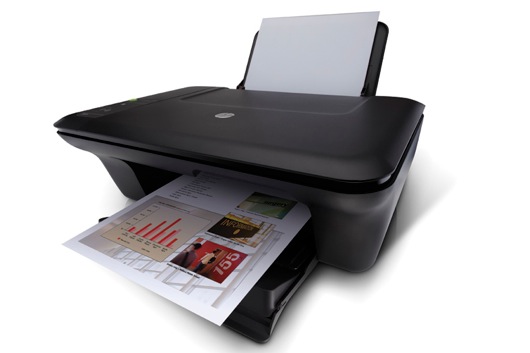
[How-To]: Setup HP Deskjet 2050 using Airport Express and Windows XP

I decided to buy Airport Extreme base station. I was looking forward to being able to share my HP Deskjet 2050 off the USB port but didn't know if my old XP PC would be able to use it. After much searching, I found these instructions and all is well:
  1. Make sure the printer is recognised by the base station.
  2. Select 'Add a new printer' in Windows
  3. Select 'Local Printer' in the dialog box (auto detect and install should be off), click next.
  4. Choose 'Create a new port' and "Standard TCP/IP Port'. Click next.
  5. For the printer IP address, enter the address of the base station ie. 192.169.0.112. The port name will be filled automatically. Click next.
  6. For the device type, choose 'Hewlet Packard Jet Direct', then click Finish.
  7. Choose your printer from the list and follow the rest of the prompts to install and configure the driver.
HP-Deskjet-2050-2010-12-7-09-35.jpg


Foursquare Better than Garmin GPS

  • There are times when my Garmin GPS unable to find the right address.
  • Or there are times when you didn't bring your GPS along and you are "lost".
  • This is when Foursquare come to the rescue.
  • For example, I wanted to find CWA (CIMB Wealth Advisor)'s location but somehow it was not registered in the Garmin although it can take me to Damansara Utama.
  • When I was at Damanasara Utama, I was quite lost to find the road.
  • Using Foursquare, I located CWA's location (Search in "Places")


  • Click "More Info" to see its location on a Map.


  • Click the RED dot to open the iPhone's Map app.


  • By clicking the "Directions", it will give the route from your existing location to the destination.


  • Follow the route. Voila!


- Posted using BlogPress from my iPhone

ShareThis

LinkWithin

Related Posts Plugin for WordPress, Blogger...